
Every time I prepare for a train journey, there’s always a lingering question: “Will my name appear in the final chart?” It feels oddly anxious, doesn’t it? You’ve booked the ticket, you’ve confirmed your berth, but not seeing your name in the chart, even briefly can stir that little doubt. Thankfully, modern railway systems now allow us to check whether our name is listed in the train chart online. In India, for example, IRCTC provides access to the reservation (or train) chart, which contains passenger names, coach & berth allocation, and more.
Over the next lines, I’ll walk you through a human-friendly, step-by-step guide to check your name in the train chart. I’ll also explore timings, caveats, and alternate methods you may not know about. Let’s make sure that the last check before boarding becomes a routine you do confidently.
When Is The Train Chart Prepared?
Railways generally finalize the chart a few hours before the train’s departure. In India’s case, it is often prepared about 4 hours prior to the scheduled departure time. But sometimes, updates continue until about 30 minutes before departure to accommodate last-minute changes.
Why this timing matters:
- If you try to check too early (say 8–10 hours before), the chart may not exist yet.
- If you check too late, some dynamic changes may be made, or the chart may already be closed.
- For some routes or services, multiple charting points exist (for different boarding stations).
Think of charting as locking in the final arrangement of who sits where. Once the list is frozen, you can easily confirm if your journey is secured.
What Information Does The Chart Show?
A chart is more than just a passenger list. It’s a complete record of travel allocations. Here’s what you’ll usually see:
- Passenger name as per the booking
- Seat or berth number (e.g., 2A – Lower Berth)
- Coach number (like B3 or S2)
- Boarding station and final destination
- PNR number linked to the ticket
- Ticket status – Confirmed, RAC, or Waitlisted
If your booking remains waitlisted at charting time, your name may not appear in the confirmed section. The chart is not just for you; it also helps railway staff validate passengers quickly. Seeing your name there provides peace of mind that your travel is officially recognized.
How To Check Reservation Chart On The Official Website?
The most reliable way is to use the official railway portal. Here’s a step-by-step:
- Visit the official reservation chart page (IRCTC provides a direct link).
- Enter the train number or train name.
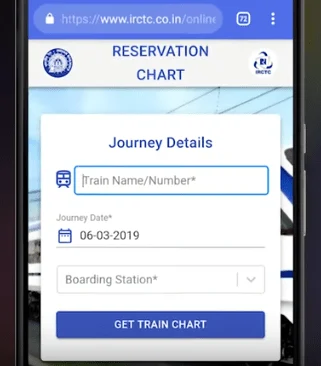
- Select the journey date.
- Add boarding station details if required.
- Click on “Get Chart.”
- Scroll or search (Ctrl + F) to find your name.
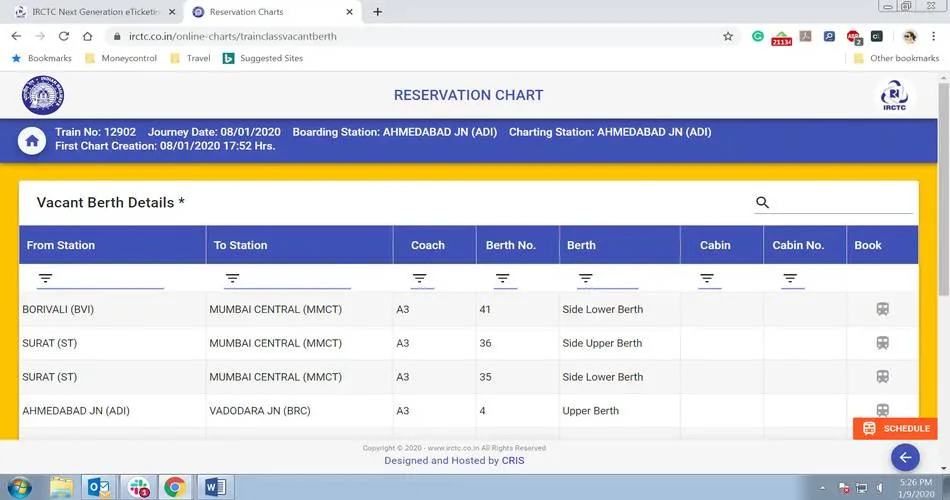
A few practical tips: use a desktop if possible for easier navigation, double-check train details, and keep your ticket handy for matching PNR and seat details. If the chart isn’t available yet, you’ll see messages like “Chart Not Prepared.”
How To Check the Reservation Chart Using Mobile Apps?
Mobile apps make this task easier, especially when you’re traveling.
Why use apps
- You can check anytime, anywhere.
- Many apps notify you once charts are prepared.
- User-friendly design helps you search faster.
Steps to follow
- Open the official IRCTC app or a partner app.
- Look for the “Reservation Chart” or “Chart Vacancy” option.
- Enter train number, date, and boarding point.
- Tap “Get Chart.”
- Search for your name in the list.
Do note that some apps only show vacant berths, not full passenger lists. So, when in doubt, cross-check with the official website.
What To Do If Your Name Is Missing?
Not finding your name can be worrying, but it doesn’t always mean the worst. Here are common reasons:
- The chart isn’t ready yet – check again closer to departure.
- Your ticket stayed on the waitlist or RAC at charting time.
- Wrong date, station, or train number entered.
- Booking error or cancellation.
- Segment charting is done separately for your boarding point.
- Technical glitch in the system.
What you should do:
- Re-enter details carefully.
- Try again after 20–30 minutes.
- Call the railway helpline for clarification.
- Carry your booking SMS or PDF to prove you hold a valid ticket.
Most of the time, the issue is timing or input error rather than cancellation. But checking again ensures you don’t get an unpleasant surprise at the platform.
How To Use a PNR Number For Chart Checking?
One of the simplest ways to check whether your name is in the chart is by using your PNR number. Every train ticket in India comes with a 10-digit PNR number, which acts as your unique travel ID.
Steps to check using PNR:
- Open the official IRCTC website or app.
- Go to the “PNR Status” or “Chart” section.
- Enter your 10-digit PNR number.
- Hit submit and wait for the result.
- The screen will display your booking status and whether your seat is confirmed.
- If the chart is prepared, your coach and berth details will also be visible.
- If it still says “Chart Not Prepared,” you’ll need to check again later.
This method is direct and much faster than scrolling through hundreds of passenger names. It’s especially useful when traveling in large trains with many coaches.
Difference Between Chart Vacancy And Chart Names:
A lot of passengers get confused between “Chart Vacancy” and the actual reservation chart. Both sound similar but serve different purposes.
- Reservation Chart: Shows the list of all booked passengers, along with names, berth numbers, and statuses.
- Chart Vacancy: Only shows the number of seats or berths that are still empty after charting.
For example, if a coach has 72 berths and only 68 are booked, the chart vacancy will show 4 available seats, but it won’t display the names of passengers.
Checking the Chart At The Railway Station:
Not everyone is comfortable with online tools. Even today, many travelers prefer physically confirming their names at the station. Railway stations still maintain printed charts outside each coach and on designated boards.
Here’s how you can do it at the station:
- Reach the station at least 30–40 minutes before departure.
- Look for the display boards where printed charts are pinned.
- Find your train and coach number in the list.
- Locate your name in the alphabetical or berth-wise order.
- If confused, ask the station master or on-duty staff for help.
This traditional method is foolproof because it’s directly updated by the railways. However, it can be time-consuming, especially if you’re in a rush or the platform is crowded.
Common Mistakes While Checking The Chart:
Sometimes passengers panic unnecessarily because they make small mistakes while checking. These are some frequent errors:
- Entering the wrong train number or journey date.
- Checking too early before the chart is finalized.
- Using third-party apps that don’t sync in real time.
- Forgetting that charting may be done separately for boarding stations.
- Confusing “vacancy chart” with “passenger chart.”
The best solution is to always double-check details carefully and give it some time before re-checking if the chart hasn’t yet been prepared.
Benefits Of Checking a Name Online Before Travel:
Checking your name online might seem like an extra step, but it can save you from unpleasant surprises.
Key benefits:
- Peace of mind: You know your berth and coach are reserved.
- Avoid confusion: No running around at the station to check lists.
- Last-minute adjustments: If your name isn’t listed, you can act early.
- Time saving: Everything is visible in a few clicks.
- Safer travel: Carrying proof of a confirmed booking reduces disputes.
With just a smartphone and internet connection, you eliminate the stress of boarding without knowing your exact status.
What Happens If a Chart Shows RAC Or WL?
If your name appears as RAC (Reservation Against Cancellation) or WL (Waitlisted) in the final chart, it changes how your journey will look.
- RAC: You’ll be given a seat, but not a full berth. Two RAC passengers may share one berth until further cancellations occur.
- WL: If your ticket remains waitlisted after charting, you cannot board with that ticket. The fare is automatically refunded for e-tickets.
What you should do:
- For RAC, board confidently and ask the TTE for updates during the journey.
- For WL, do not travel, as your ticket is technically invalid. Instead, book an alternative route if available.
Knowing this beforehand saves you from awkward situations during boarding.
Offline Alternatives To Online Checking:
In some cases, internet issues or server downtime can make online chart checking impossible. In such situations, you can use these offline alternatives:
- Printed charts at the station (still displayed on boards).
- Asking the TTE (Travelling Ticket Examiner) on the platform.
- Enquiry counters at major stations.
- Railway inquiry helpline numbers.
These may feel old-school, but they remain reliable backups when technology doesn’t cooperate.
Conclusion:
Checking your name in the train chart is no longer a complicated task. With official websites, mobile apps, and even traditional station boards, you have multiple ways to confirm your seat before the train departs. The key is timing; know when the chart is prepared, and always double-check the details. Whether you use your PNR number online or scan the physical chart at the station, making sure your name appears gives you the confidence that your journey is secured.
FAQs:
It is generally prepared 4 hours before departure, but updates may happen until 30 minutes prior.
Yes, the PNR number is the easiest way to confirm your name, coach, and berth details.
Possible reasons include the chart not being ready, the ticket being waitlisted, or incorrect input of train/date.
The reservation chart shows the names of passengers, while the chart vacancy only shows available seats.
No, waitlisted tickets after charting are invalid. Only confirmed and RAC tickets are valid for boarding.